
Don’t Give Your AI Agent Memory
 Erik Munkby
Context rot means worse output. The fix isn’t better memory, it’s a better workflow.
Everyone is racing to give their AI agent memory. RAG pipelines, memory graphs, the auto-memory features now shipping inside the coding agents themselves. I’ve tried most of them, and I’ve come to think the whole project is backwards. The agent was never the right place to keep that memory.
I know how the following sounds, because the moment that convinced me looks like a poster child for agent memory. Two of my AI coding sessions, a couple of weeks apart, got annoyed by the exact same thing: same overloaded component, same duplicated mock setup smeared across three test files. Neither session had the faintest idea the other existed. Surely this is exactly what memory is supposed to fix?
The price of this “obvious fix”. The agent should just remember this stuff, right? But context is precious. Every token you feed back into a session bloats the one resource that measurably degrades as it grows. Researchers call it context rot, you pay once in tokens and again in accuracy, and we’ll dig into the numbers in a minute.
So those two complaints survived a different way: through the workflow around the agent, not a memory feature inside it. That’s what this post is about: a loop that catches what your agent notices and you’d forget, without stuffing a single extra token into its context. It’s also the follow-up I promised in my last post, where I argued that agents don’t need better prompts, they need better feedback loops.
More Memory Makes It Worse
Before we get to what works, let’s be clear about why the obvious fix doesn’t. The intuition behind agent memory is completely reasonable: the agent forgets everything between sessions, so write things down and feed them back in next time. It’s how you’d onboard a colleague.
The problem is where those notes end up: in the model’s context window. And we now have real measurements of what happens in there. Chroma’s Context Rot report tested 18 frontier models and found that every single one degrades as input length grows, even on deliberately trivial tasks, long before the window is anywhere near full. Worse, irrelevant content doesn’t just get ignored. Distractors actively drag accuracy down.
Now look at what a memory feature actually does. It takes notes the agent wrote to itself, unreviewed, and pours them into that exact window at the start of every session (whether it’s via skill-like references, searchable db, or worst case plain text). More tokens, more distractors, more rot. In my last post I covered the ETH Zurich study showing that instruction files alone tend to reduce task success while costing over 20% more inference. Auto-memory is the same bet with the stakes raised.
Maybe some future architecture uses context so differently that this stops being true. Until then, giving your agent more memory is pouring water into a leaky bucket, and I’m not betting my workflow on the bucket getting fixed. The answer is to keep the memory outside the context entirely: capture what the agent notices in the workflow, act on it, and let the fixes land where the next session actually reads them. The workflow is the memory. The code is the store.
Last time I put it this way: the codebase is the instruction. This is the same principle, with the loop closed.
Head, Desk, Backlog
So what does “the workflow is the memory” look like in practice? Let’s start with where the signal leaks.
Your agent is deep in a feature when it spots something three lines away: a fragile abstraction, a test that doesn’t really test anything, a pattern that’s going to hurt in six months. In my last post I called these the bug-next-door and tunnel-vision problems. The agent absolutely notices the thing. It just won’t act on it, because the thing isn’t the task, and when the session closes the observation dies with it.
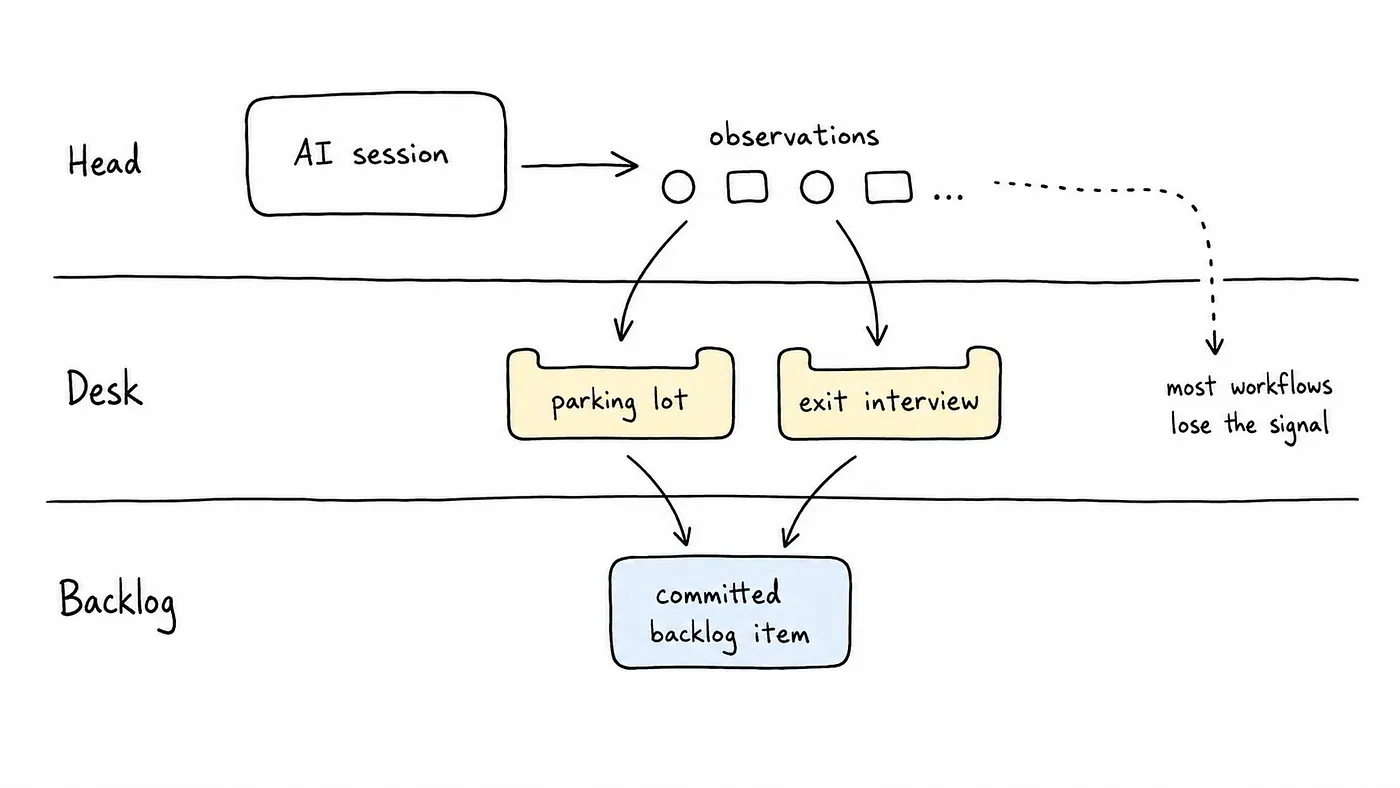
One lost insight is no big deal. Multiply it across dozens of sessions a week and you get something genuinely corrosive: death by a thousand forgotten post-its. To fix a leak you need to know where it springs, so here’s the model I keep in my head. Any observation lives at one of three levels:
- Head (ephemeral): it lives in the agent’s context and dies with the session.
- Desk (captured): lightweight, persistent, untriaged. The “not now” bucket, made real.
- Backlog (committed): triaged, prioritized, part of the plan. A GitHub issue with a number on it.
Most workflows only have two of these: the agent’s head, and your backlog. Something is either live in context or a fully triaged issue, and that in-between is exactly where the signal escapes.
The desk is the missing layer, and it’s the layer I built lazytask to fill. Tasks are plain markdown files in a .tasks/ folder, with a TUI for when I want to browse them like a human and a JSON CLI for the agent. I run a few projects side by side, so it also had to double as a featherweight task board that holds up when I’m not watching. But the part that matters here is that the desk has two trays, and they fill up in completely different ways:
- The parking lot. When the agent hits a bug-next-door, it deliberately drops a note: out of scope, worth keeping. The agent doesn’t fix the bug. It just writes it down and gets back to work.
- The exit interview. Every time a task is marked done, the agent answers a few questions before it’s allowed to leave: what slowed you down, what surprised you, what almost went wrong. The agent never has to decide whether something is worth remembering. Finishing the task is the trigger.
That second tray is the one people underestimate, and it’s the forced reflection I hand-waved at last time. Nothing in there will ever feel urgent, and that’s exactly the point. It’s the quirks and near-misses nobody would ever file an issue for, captured at the moment they’re fresh.
And notice what neither tray does: neither one goes anywhere near the agent’s context. A stateless agent, with a stateful workflow wrapped around it.
The Profile Page Receipt
Enough theory. Let me walk you through the loop actually paying off, on the most boring bug you can imagine.
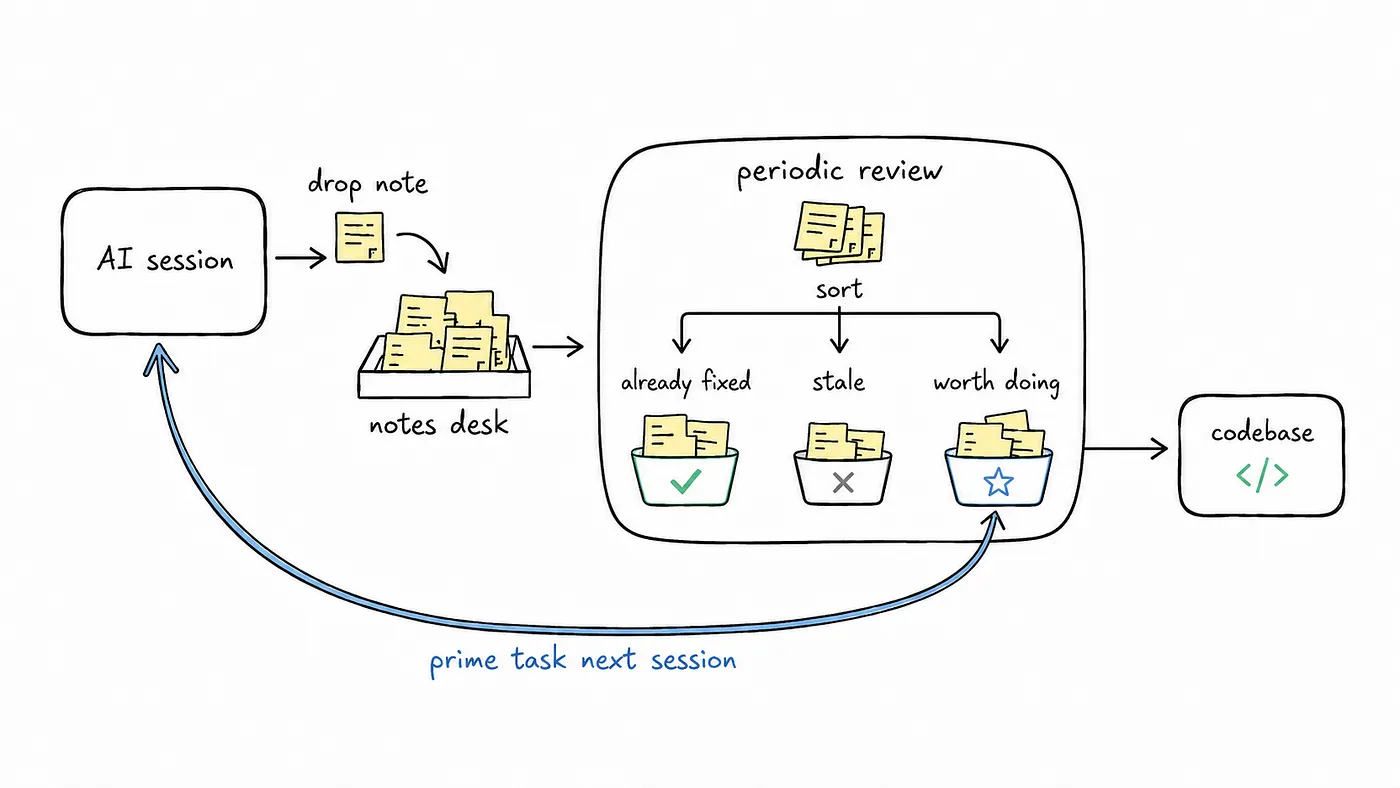
I was building account deletion in Matredo, a hobby project of mine. Partway through, the agent needed to wire a new hook into our ProfilePage component, which meant updating the same ProfilePage mock across three separate test files. It did the work fine, and when it marked the task done, one line in its exit interview read: “Updating this hook means touching three mock setups. Consider extracting a shared mock factory.” Useful observation. Not the task, though, so it landed on the desk and the session closed.
A few days later I was on a completely different feature, pay-gating, and the agent ran straight through ProfilePage again. Same component, same three mocks, same little dance. Its exit interview flagged the friction a second time, in almost the same words, with no idea the first session ever happened.
You’ve met these two already. They’re the strangers from the top of the post. Then I ran the review. lt learn --review takes everything that has piled up on the desk and asks the agent to sort through it. Out of twelve captured notes it came back with a tidy breakdown: seven were already fixed by other work, three no longer applied, and three were actually worth doing. The mock-factory note was one of the three, and now it had real weight behind it.
The fix took maybe a minute. One primeMocks() call in beforeEach, and three brittle setups folded into one. The fix was always trivial. The hard part was noticing it was worth doing, and let’s be honest, no human was ever going to scroll back through two weeks of sessions hunting for a duplicated mock setup. The repetition was the signal, and the loop was the only thing in a position to catch it.
There are two quieter wins hiding in that 7 / 3 / 3 split. The first is that the review subtracts. It didn’t dump thirteen fresh to-dos in my lap, it told me most of them had already sorted themselves out and handed me only the three that hadn’t. A capture system that just piles up noise is worse than no system at all.
The second is my favorite. Those seven “already fixed” notes aren’t waste, they’re the store doing its job. Each one described a problem some later session fixed in the code itself, and every session since gets that fix for free just by reading the codebase. Nothing had to be remembered, because it had been absorbed.
The Green Tests Were Lying
Let’s pull back for a second. A deduplicated mock factory is a fun little demo, but you’d be completely fair to ask whether this loop ever catches anything that really matters. So here’s the one that turned me into a believer.
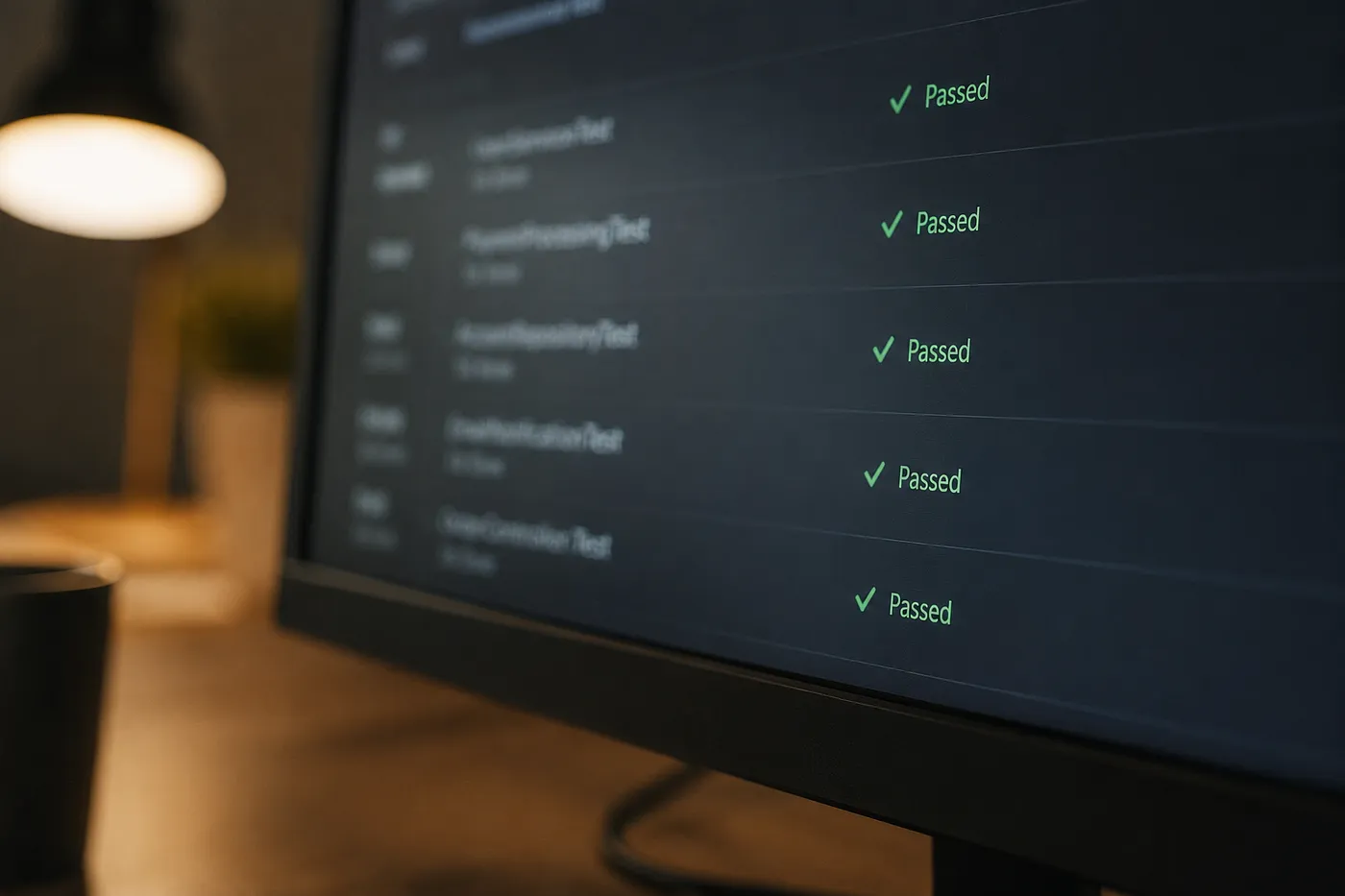
Another recent review surfaced a pattern that really worried me: your test infrastructure can hide the exact bug it exists to catch. A whole suite of persistence tests was sitting there green, while the feature it was supposedly covering was silently rolling back in production. The tests were reading rows that had been flushed but never committed, so they “saw” data the real database never actually kept. False confidence, baked right into the harness. The loop spotted the pattern across sessions before it ever got the chance to bite me in prod.
That same review queue has since turned up a connection-pool leak and a GDPR-deletion gap too. The point isn’t any one of those specific bugs. It’s that a workflow with no structure would have quietly dropped every single one of them.
We’re early, the tooling is rough, and this is a mid-2026 snapshot that will probably look quaint in a year. But the pattern already holds, and I think the developers who get their feedback loops right now are going to compound that edge over every project they touch. Not because their agents remember more, but because their workflow remembers for them, and their code keeps what’s worth keeping. The workflow is the memory. The code is the store.
Next Steps
You don’t really need my tool to start. You need the habit.
Try this on your very next AI session. Before you close it, run the exit interview yourself. Ask the agent: what did you notice that wasn’t part of the task? What slowed you down? Write the answers down somewhere, anywhere, a scratch file is completely fine. Do that for a week, then go back and read what piled up. I’d put money on you finding at least one thing you’re glad you caught, and at least one you’d have sworn you’d remember and then completely forgot.
If you’d rather start with the desk already built, lazytask is open source. And if you haven’t read where this whole thread kicked off, the codebase-is-the-instruction argument lives in my last post.
lazytask is early, and I’d much rather build it with some company than alone. If the missing-layer idea clicks for you, or if you think I’ve got it backwards, come find me. It’s built for treating AI as an exoskeleton, not a swarm.